


Accessories for Canon R5 camera
If you know me, you know that I am very passionate about camera equipment. Having recently written detailed pages on all lenses for each mount and other pages describing all current available cameras by brand, I’m starting on accessories, and more particularly with Canon R5 accessories.
I decided to arbitrarily start with Canon, but other brands will follow suit without too much trouble. I realize that many of you are looking for accessories for your cameras, so I thought it would be a good idea to list and detail all my findings for this Canon R5 camera.
Check out my practical photography packs. It's a simple, fun and entertaining way to learn and improve in photography, especially in the field!
Here are all the interesting accessories I found for the Canon R5. If you want to know more about this camera, I give full details on it, on the page covering the current Canon RF full-frame mirrorless cameras.
If you are thinking about buying a camera, here are the Canon R5’s main features. I also suggest you compare Canon R5 prices at two different retailers.
| Characteristic | Visual |
|---|---|
|  |
If you already own a Canon R5, I invite you to have a look at our page with all the current Canon RF lenses. We will update this page as soon as new Canon or third-party lenses are released.
If you enjoyed this article and if you found what you were looking for, don’t hesitate to share it with your friends, family or community, it will surely help someone!
Canon R5 batteries and battery charger
Let’s start with the basics, the indispensable accessory for your Canon R5 if you want to take pictures for longer. If you need additional batteries, which are always useful to have, I advise you to choose Canon ones, if possible, to be sure of their compatibility with your camera. The battery named “LP-E6NH” is the one to consider. It is the latest battery version, more recent than the one in the Canon R (the LP-E6N). However, you should know that the LP-E6N battery also works well in the Canon R5. Note that these are the same batteries than the ones of the old Canon DSLR cameras (5D series, 7D Mark II or the Canon 90D). Finally, the old type LP-E6 batteries (ex: DSLR – Canon 7D, 70D) are also compatible with this Canon R5. If you are considering switching from DSLR to mirrorless, it is always good to know.


Canon reports the battery can be fully charged in 2.5 hours. The battery charges with the Canon LC-E6 charger which is also compatible with: Canon EOS 5D Mark II, 5D Mark III, 5D Mark IV, 5DS, 5DS R, 6D, 6D Mark II, 7D, 60D, 70D, 80D, R6, and video cameras, the XC10 HD, and XC15 4K.
You can also find third-party brands that offer much cheaper batteries that work relatively well on this Canon R5. From all my research, I found that the “BM premium” and “Powerextra” brands have a good reputation for a third of the price of the classic Canon battery. Other brands exist, of course.
Here are the batteries and chargers mentioned below.
Canon R5 memory cards
This is one of the most important accessories for your digital camera. Here are some interesting facts to remember when choosing your memory card for you Canon R5:
- The Canon R5 has two slots for two different types of memory cards: One slot for a CFexpress Type-B card (Type-A does not work) and another slot for a UHS-II SD card,
- The choice of card will mainly depend on your use: mostly video or photography? 8 or 10 Bits? Burst mode or not?
- Be careful, because depending on your use, Canon confirms that not all CFexpress Type-B cards will perfectly work with the Canon R5, especially when it comes to 8K RAW videos.
- You can shoot 8K with an SD card, but only with “IPB” compression and with a UHS-II V60 class (at least). The “ALL-I and RAW” setting requires a CFexpress card,
- To shoot 8K RAWs, you will need a high-end CFexpress card.
In any case, keep in mind that while CFexpress cards are generally faster than SD cards, they are prone to overheating. You should also know that writing speed will have the most influence on your shots (burst or video shooting). Should you want to go in more depth on the subject, I invite you to read my full-length article on how to choose a memory card.
Based on my research on the subject, I recommend in the table below, several serious CFexpress Type-B card (which can support 8K RAW video shooting), and some SD UHS-II cards for the Canon R5.
| Canon R5 memory cards | Best Price | |
|---|---|---|
| SD USH-II V90 SD Memory Cards | ||
| ProGrade Digital UHS-II SDXC | Amazon B&H | |
| Sony G Tough UHS-II SDHC | Amazon B&H | |
| SanDisk Extreme PRO UHS-II SDXC | Amazon B&H | |
| Lexar Professional 2000x UHS-II SDXC | Amazon B&H | |
| Kingston Canvas React v90 | Amazon | |
| UHS-II V60 SD Memory Cards | ||
| Lexar Professional 1667x UHS-II SDXC | Amazon B&H | |
| CFexpress Type-B Memory Cards | ||
| Sony TOUGH-M series SDXC UHS-II Type B | Amazon B&H | |
| Angelbird AV PRO CFexpress 2.0 Type B | Amazon B&H | |
| ProGrade Digital CFexpress 2.0 Cobalt | Amazon B&H | |
| Lexar Professional CFexpress Type-B GOLD | Amazon B&H | |
| Lexar Professional CFexpress Type B DIAMOND | B&H | |
| Delkin Devices CFexpress | Amazon B&H | |
| SanDisk Extreme PRO CFexpress Type B | Amazon B&H | |
| SONY CFexpress Tough Type-B | Amazon B&H | |
Finally, you will also have to buy a CFexpress card reader. I recommend this model from ProGrade which allows you to read the 2 memory card types compatible with the Canon R5, namely, CFexpress Type-B and SD UHS-II cards.
Other CFexpress Type-B card readers exist, of course. Here is a selection in the table below.
| Canon R5 Memory Card Reader | Best Price |
|---|---|
| ProGrade Digital CFexpress Type B & UHS-II SDXC Memory Card Reader | Amazon B&H |
| Sony MRW-G1 CFexpress Type B/XQD Memory Card Reader | Amazon B&H |
| Lexar Professional CFexpress Type B USB 3.2 Gen 2x2 Memory Reader | Amazon B&H |
| SanDisk Extreme PRO CFexpress Type B Memory Card Reader | Amazon B&H |
For more information on memory cards which can be used with this camera, you can look at the Canon R5 manual.
Canon R5 battery Grip
I’m mostly going to talk here about the two Canon battery grips available for the Canon R5 camera.
Canon currently provides 2 battery grips for its Canon R5 camera:
- The Canon BG-R10 grip: it is compatible with Canon’s R5, R6, R6II (confirmed by Canon), and R5C. It can accommodate two LP-E6NH type batteries (and even the old LP-E6N or LP-E6). The grip offers an additional set of controls that will allow for easy shooting in vertical position (several buttons available). It is possible to charge the batteries of the grip through simple connection of the body to a power source. Finally, as far as the body is concerned, the battery grip is advertised as tropicalized, and resistant to dust and humidity,
- The Canon WFT-R10A Wireless File Transmitter grip is a true copy of the above-mentioned grip, at a sky-high price. However, this grip does provide a Wi-Fi file transmitter function with faster transmissions and longer ranges. The grip also has a 1GB ethernet port.

However, you should know that there are other third-party brands offering power grips for this mirrorless camera. For example, I found a battery grip from Mcoplus that seems to work well with a Canon R5, R5C, or R6.
Quick note: Canon also proposes a power adapter (Canon AC-E6N) which, connected to the Canon DR-E6 DC coupler, enables use of the camera directly plugged into the mains, and thus without battery. This can be interesting for prolonged use (Time-Lapse or studio for example). Check the links in the table.
Canon R5 GPS
Canon decided not to include a GPS on this Canon R5, justifying the fact that you can use a smartphone and the Camera Connect app to activate geolocation of your pictures. In terms of autonomy (for both devices), this is clearly not ideal. If you need a GPS for a Canon R5, to my knowledge, the only possibility is to go with the Canon GPS GP-E2.

This is a GPS receiver compatible with a whole range of Canon cameras (mirroless, DSLR), including the Canon R5, R6 and the recent Canon APS-C RF cameras, as well as the Canon R7 and R10. This GPS receiver is rather compact and can be integrated through the accessory shoe or the USB terminal of the camera. It allows the automatic attachment of the GPS coordinates to your photos in the EXIF. This receiver also includes a digital compass. It works with a single AA battery.
Canon R5 Cages
Camera cages are used to protect the camera itself but also to mount other accessories such as a magic arm or a microphone. It is basically used as a mounting stand. It is a very popular accessory with videographers. As you can imagine, there are a lot of brands selling Canon R5 cages . SmallRig is one of the best rated brands and offers various very interesting cages. You should also know that SmallRig proposes a SunHood Screen Sunshade for your Canon R5 screen (see the link in the table below).
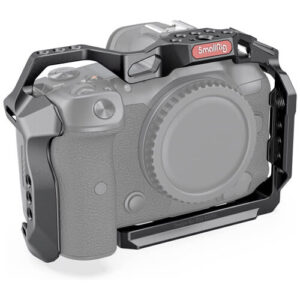
Other lesser-known brands also offer Canon R5 cages like Neewer or FOTOBETTER. Here is a selection of the best Canon R5 cages that I could find.
| Canon R5 Cages | Best Price |
|---|---|
| SmallRig Camera Cage | Amazon B&H |
| SmallRig demi-cage | Amazon |
| SmallRig Camera Cage Kit (Top Handle and dedicated Cable Clamp) | Amazon |
| SmallRig Camera Cage (with BG-R10 Battery Grip) | Amazon B&H |
| NEEWER Camera Cage | Amazon |
| Neewer camera Cage (for video) | Amazon |
| SmallRig HDMI and USB-C Clamp | Amazon |
| SmallRig Camera SunHood Screen Sunshade | Amazon |
Canon R5 L-Bracket
You may not be familiar with these well-known quick plates, often called “L-bracket” or “L-plate”. They simply are an accessory that allows you to shoot in portrait or landscape mode without the need to do anything to your tripod’s head. Indeed, its “L” shape allows you to switch from horizontal to vertical position in a few seconds. The main advantage of using this type of L-shaped quick release plate is to avoid side offset of your tripod, which can be annoying, for example, with heavy lenses (i.e telephoto lens). In other words, you keep your center of gravity in the center, avoiding the risk of the tripod falling/tilting to the side. A very good accessory for your Canon R5.

Moreover, by using this L-shaped plate, you keep the same perspective and the same picture positioning, only changing its orientation. Finally, even if this is not the main purpose, it protects your camera should it fall.
Landscape photographers, especially passionate about panoramic pictures, often use this type of fast L-shaped plate. In terms of manufacturers, we obviously have SmallRig which proposes very good L-brackets, but other brands such as “3 Legged Thing” are also on the market.
Here is a selection of the best L-brackets for your Canon R5.
| Canon R5 Dedicated L-Brackets & Plates | Best Price |
|---|---|
| 3 Legged Thing Roxie-G L-Bracket | Amazon B&H |
| Kirk Camera Plate for Canon EOS R5 | B&H |
| Sunwayfoto Custom L-Bracket for Canon EOS R5 | Amazon B&H |
| LEOFOTO LPC-R5 Canon R5 | Amazon |
| Haoge LPC-R5 L Bracket (Arca Style Compatible Quick Release Plate) | Amazon |
| Really Right Stuff Base Plate for Canon EOS R5 | B&H |
Canon R5 cap
Nothing special to say here! If you’ve lost your Canon R5 cap, you’ll find a whole bunch of them to buy, from Canon or other third-party brands. I recommend one of them in the table below.
Protective and anti-scratch skins for Canon R5
Here is another interesting accessory to consider for your Canon R5. I have voluntarily grouped here silicone protections for this camera and anti-scratch protections (stickers). Here too, several brands are available, the one that often separates from the crowd is the EasyCover.

Here is a small selection in the table below.
Screen protector for Canon R5
Another small accessory that costs nothing and is worth considering. Different brands are available. I chose the one that had the best reviews.
Canon R5 in-camera filters
For more than a few years now, several brands have been developing in-camera filters that you can place in front of your camera’s sensor. Also known as a “Clip filter”, it is a thin optical glass plate, weighing only a few grams, which is clipped and unclipped in front of the sensor of your camera with a small tool strongly resembling a guitar pick.

These filters do not cause vignetting unlike classic filters that are screwed in front of the lens. This may be even more interesting for people who have ultra-wide-angle lenses with a curved front element, although this argument is becoming less and less true on mirrorless cameras now able to produce 14mm ultra wide-angle full frame lenses without a curved front element. They also are interesting if you often change lenses. However, you must be careful not to install these filters in windy and dusty conditions for fear of soiling your sensor.
KASE currently proposes several types of filters: UV filter, ND filter (different opacity) and a night filter.
Canon R5 eyecup
Nothing too complicated here, but I found this small accessory to be useful. Several brands are available and I selected the one with the best review.
Canon R5 underwater housing
This article on the best accessories for a Canon R5 ends with a special accessory: the waterproof underwater housing for snorkelling or scuba diving. As I have been diving for quite a long time now, one brand comes on top: Ikelite.
Here are the two brand references I found to bring your Canon R5 underwater, the Ikelite 200DL (-60m) and the Ikelite 50DL (-15m).
Canon R5 remote control
As usual, you will have a choice between Canon and third-party remote control(s) . There are too many to list, but let me give you the two references from Canon
- The Canon BR-E1 wireless remote control
- The TC-80N3 Canon remote control
I’m coming to the end of this article on Canon R5 accessories. I’ve already listed a lot of things here, but if you can think of interesting accessories to add to the list, don’t hesitate to tell me in the comments.
See you soon for other Canon accessories and accessories for other camera brands.
If you already own a Canon R5 mirrorless camera, don’t hesitate to check if your firmware is up to date.
Sylvain
Did you like the post? Follow us!

Written by Sylvain PONS
I've been passionate about photography since 2010, learning as I went along. Today, I dedicate myself to guiding others in their choice of camera gear and sharing a variety of tips to improve their photography skills.
Despite our care, a mistake may have slipped into this article. If you find any, please don't hesitate to let us know so we can correct it as soon as possible and keep our information up-to-date!