Which iPad should you choose? Our complete guide
Last update: 06/23/2026
Our blog continues to grow thanks to you, our readers. This post may contain affiliate links, which means we can earn a small commission if you make a purchase through them, at no extra cost to you. This helps us to continue to bring you more and support our work!
Hello! This time, I’m switching to a very different topic to help you choose the iPad that suits you best. Over the years, the iPad has become a must-have device, and not only for Apple fans. Let’s be honest: Apple’s reputation speaks for itself, with sleek design, long-term durability, regular updates, and, above all, an ecosystem that connects all your devices smoothly. But not every iPad is made for the same type of use. That’s why it’s important to choose the model that gives you the best value for your needs. And since iPads are not exactly cheap, it would be a shame to make the wrong choice. This is also an important point we cover in our article on the best action cameras of the moment.
And let’s face it: a well-chosen iPad can replace a lot of things, from an e-reader and a notebook with Apple Pencil to a gaming console, a creative tool, or even a small photo and video studio. Add a keyboard, and it can almost work like a computer that you can easily take anywhere. That already gives it plenty of advantages, but there’s more. iPads also tend to hold their resale value well, offer well-optimized apps, and provide a smooth, intuitive interface. In short, an iPad can become a reliable everyday companion for years.
So, to answer the question: which iPad should you choose without getting lost in the different ranges and technical specifications? That’s exactly the goal of this article. In this guide, I’ll help you find the right iPad model, along with the accessories that make sense for your use. On the agenda: the criteria that really matter, including power, screen, storage, Apple Pencil and keyboard compatibility, plus my clear recommendations.
Before we start, we recently published a complete guide to portable photo printers in the same spirit as this article. If this trendy little accessory interests you, I think it could really help.
Guide to the best iPads of the moment
For this guide, I deliberately focused on the 4 main iPad models in Apple’s current lineup. They cover the most common needs: entertainment, creativity, professional work, studies, and budget. If you’re more of a visual person, you’ll find a summary table of these 4 iPads at the end of this selection. It’s a useful way to review the key features of each model and compare them side by side.
iPad mini (A17 Pro)
Available since October 2024, the iPad mini with A17 Pro is all about a lightweight, compact format that is easy to carry. For display quality, it features an 8.3-inch Liquid Retina screen with P3 wide color, True Tone, and an anti-reflective coating. It charges via USB-C, which makes connecting accessories much easier. Feature-wise, it uses Touch ID and works with Apple Pencil Pro and Apple Pencil (USB-C).
For storage, it comes in three options: 128, 256, and 512 GB. It is available in 4 colors: Space Gray, Starlight, Blue, and Purple. It is also powered by the A17 Pro chip, which delivers excellent responsiveness and speed. On the photo and video side, it has a 12 MP rear camera capable of recording 4K video. It also includes a 12 MP Center Stage front camera, positioned for video calls. Audio is handled by two microphones and stereo speakers in landscape orientation. No complaints on connectivity either: it is up to date with Wi-Fi 6E and Bluetooth 5.3. Cellular versions also include 5G, eSIM, and GPS.
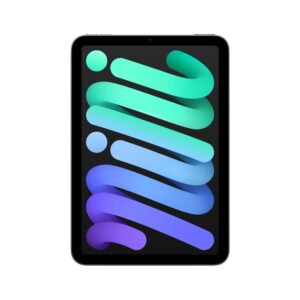
iPad mini (A17 Pro)
In practice, the iPad mini fits almost anywhere while still being comfortable enough for reading, note-taking, watching videos, or drawing with Apple Pencil Pro or Apple Pencil (USB-C). Its power and next-generation connectivity make it especially appealing for students, professionals who are often on the move, and light creative work. In short: a compact, intuitive iPad with good battery life that can easily last through a full day of use.
iPad (A16)
Launched in 2025, the iPad with A16 features a clean, modern design with an 11-inch Liquid Retina display, True Tone, and a fingerprint-resistant coating. For unlocking, it uses Touch ID, while USB-C handles charging and accessories. It also keeps the Smart Connector for compatible keyboards. There are now three storage options: 128, 256, and 512 GB. The colors remain bright and fun: Silver, Blue, Pink, and Yellow.
It is powered by the A16 chip, which is more than enough for everyday use and keeps the experience smooth. For photo and video, it has a 12 MP rear camera that can record in 4K, as well as a landscape 12 MP Center Stage front camera, which is ideal for video calls. On the connectivity side, it supports Wi-Fi 6 and Bluetooth 5.3, while Cellular versions add 5G and eSIM. Charging and video output are handled via USB-C. It works with Apple Pencil (USB-C) and Apple Pencil (1st generation) with an adapter.
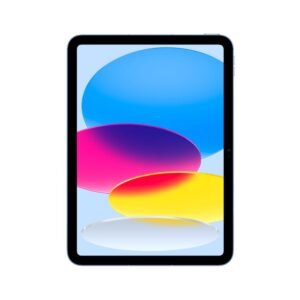
iPad (A16)
In short, the iPad with A16 offers a very comfortable display size and a landscape front camera. It’s an ideal companion for classes, remote work, streaming, or creative hobbies. Its strengths are easy to sum up: versatility, simplicity, and good value for money. It’s made for users who want a modern, reliable iPad without spending too much.
iPad Air (M4)
Released in March 2026, the iPad Air with M4 offers a large Liquid Retina display in 11-inch and 13-inch versions, with P3 wide color, True Tone, a laminated panel, and an anti-reflective coating. It comes in Blue, Purple, Starlight, and Space Gray, with several storage options depending on your needs: 128 GB, 256 GB, 512 GB, and 1 TB. Like the previous models, it uses Touch ID and USB-C, while the Smart Connector is built in for keyboards. For accessories, it works with Apple Pencil Pro and Apple Pencil (USB-C).
Performance-wise, the M4 chip is very efficient, with an 8-core CPU, a 9-core GPU, a 16-core Neural Engine, and 12 GB of unified memory. It also benefits from Apple’s newer wireless chips, with Wi-Fi 7 support, and Cellular models add 5G via eSIM. The USB-C port supports faster transfers and video output. The photo and video setup includes a 12 MP rear camera and a landscape 12 MP Center Stage front camera. Audio is handled by stereo speakers and two microphones. One detail that will interest many users and really makes a difference: it supports Apple Intelligence.

iPad Air (M4)
In everyday use, the iPad Air gives you plenty of comfort for work and creativity. More concretely, it’s great for note-taking, drawing with Apple Pencil Pro, smooth video editing, and high-quality video calls. Its connectivity and M4 chip make it a powerful, versatile iPad Air for students, mobile professionals, and creatives who want a larger screen without moving up to the Pro range.
iPad Pro (M5)
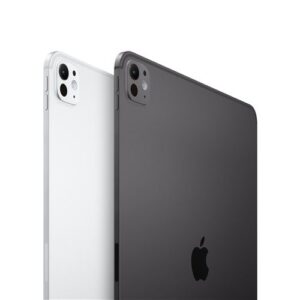
Available since October 2025, the iPad Pro with M5 comes in 11-inch and 13-inch versions and keeps its ultra-thin, lightweight design. It is available in Silver and Space Black. Its biggest strength is still the Ultra Retina XDR display with tandem OLED technology, which delivers deep contrast, accurate P3 colors, ProMotion, and True Tone. On the 1 TB and 2 TB versions, nano-texture display glass is available as an option to help reduce glare. It also supports Apple Intelligence and remains compatible with Apple Pencil Pro and the Magic Keyboard for iPad Pro.
The iPad Pro now integrates the Apple M5 chip, bringing even more power, especially for demanding creative work, 3D, editing, and AI-related tasks. For sound and image, it includes a 12 MP rear camera with 4K video, ProRes support, a LiDAR scanner, and a 12 MP landscape front camera with the TrueDepth system. Connectivity is excellent: USB-C with Thunderbolt/USB 4, support for an external display, Wi-Fi 7, Bluetooth 6, and 5G via eSIM on Cellular models.
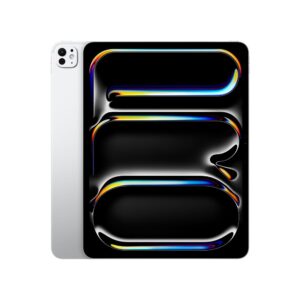
iPad Pro (M5)
In short, this iPad Pro gives you the best display, the strongest performance, smooth creative workflows, and serious potential for video editing and 3D, all while remaining easy to carry. The Pro lives up to its name; for now, it is the most advanced iPad in the lineup. It is clearly designed for professionals and demanding creatives. Of course, it is not cheap. But if you need this level of performance for your work, it is an investment worth considering. Believe me, you won’t be disappointed.
| Model | Screen size | Chip | Camera | Speakers | Port | Storage | Weight |
|---|---|---|---|---|---|---|---|
| iPad mini | 8.3” | A17 Pro | 12 MP · 4K Video | Landscape stereo | USB-C | 128 · 256 · 512 GB | 293–297 g |
| iPad (A16) | 11” | A16 | 12 MP · 4K Video | Landscape stereo | USB-C | 128 · 256 · 512 GB | 477–481 g |
| iPad Air | 11” or 13” | M4 | 12 MP · 4K Video | Landscape stereo | USB-C | 128 · 256 · 512 GB · 1 TB | 464–617 g |
| iPad Pro | 11” or 13” | M5 | 12 MP · 4K Video | 4-speaker audio system | Thunderbolt / USB 4 | 256 · 512 GB · 1 TB · 2 TB | 444–582 g |
How to choose an iPad: key elements to consider
Now that we’ve looked at the best iPads of the moment, I don’t want to stop there. In this section, I’ll walk you through the main points to consider when choosing the iPad that suits you best. Think of it as a short step-by-step guide before making your decision. It should give you a clearer idea of what really matters, which is exactly what it’s here for.
Depending on your use
In my opinion, the first question to ask yourself before starting your research is what you mainly plan to use your iPad for. Here are the models I recommend depending on your needs:
- Leisure (video, games, reading): If you want to watch series, play games, and read, I think the iPad Air is the model to look at first. It ticks all the boxes: power, a beautiful display, and a fair price. If you want even better quality and smoother performance for demanding games, you can also consider the iPad Pro, although it is much more expensive. If you download movies and games, I recommend choosing 128 or 256 GB of storage.
- Work and productivity: For office tasks, video calls, and multitasking, the iPad Air with a keyboard does the job very well. However, if you work with large files or edit photos and videos, it’s better to go for the iPad Pro. It will simply be more comfortable in the long run.
- Creative work: For drawing, retouching, video, and music, the iPad Pro remains the strongest choice thanks to its screen, accurate color rendering, and smooth Apple Pencil experience. But if your budget is tighter, the iPad Air is still a very good option for creative work. By the way, I recommend buying the compatible Apple Pencil from the start. It will make things much easier.
- Studies: No doubt about it: the iPad with A16 + keyboard + stylus combo works very well. With this model, you’ll be able to take notes, annotate PDFs, attend video classes, and still carry it around easily. To keep all your coursework safe, I recommend choosing 256 GB of storage.
- Family use: If you want to share an iPad without blowing the budget, the standard iPad is perfectly suited to the job. I’ll admit it’s less powerful than the iPad Pro. But compared with many competing tablets, it is still clearly a step above.
Depending on the features
Second, I recommend taking a closer look at each iPad’s features. Even though I already covered them in the model-by-model presentation, here are the main elements explained in a little more detail:
Screen size
To keep things simple, the 11-inch format is the most versatile: it feels comfortable in the hand while still slipping easily into a bag. It isn’t bulky at all, and it’s ideal for reading, note-taking, and even streaming. On the other hand, if you want more comfort and screen space, the 13-inch format will suit you better. It makes editing, retouching, and multitasking much easier.
Chip (performance)
To make the word “chip” more meaningful, think of it simply as the iPad’s power. iPads with A-series chips are more than enough for everyday use, including video, classes, games, and note-taking. M-series chips, on the other hand, are closer to what you find in Apple computers. They handle creative work, editing, 3D, and heavy multitasking very well. If you’re hesitating and want to keep your iPad for a long time, I recommend prioritizing an iPad with an M chip.
Storage capacity
If you’re used to relying on the cloud, 128 GB may be enough for you. But if you download videos, games, or large creative projects, go for 256 GB or more. Just so you know, creative apps and even some games can take up a lot of space. It’s better to plan ahead than to constantly delete files later.
Photo/video
Rest assured, all current iPads do very well for video calls. But the Pro models offer better quality when it comes to sensors, microphones, and video processing. For calls, the main thing to check is whether the front camera is positioned in landscape mode, which is the case for all the models presented here. If you sometimes film or vlog, the iPad Pro will give you better video and audio results.
Connector
In general, recent models use USB-C, and that’s a good thing. Honestly, it makes charging easier and is especially useful for connecting an external display, an SSD, or a card reader. Basically, with a USB-C port, you need far fewer adapters.
Compatibility
Before buying an accessory for your iPad, always check your iPad’s generation and size. I’m mentioning this because keyboards and Apple Pencils can look very similar, but they are not all compatible with every iPad. It would be a shame to get it wrong. Don’t worry, a quick check beforehand is enough to avoid unpleasant surprises.
Apple Pencil
After choosing your iPad model, I’d say the second most important accessory is the Apple Pencil. There are several versions, so it isn’t always easy to choose. To save you time, here’s a quick overview of the different Apple Pencils:
- Apple Pencil Pro: it is mainly designed for demanding creatives. It offers more gestures, more precise control, and excellent responsiveness for drawing and retouching.
- Apple Pencil USB-C: for charging and pairing the first time, it needs to be plugged in. After that, it works via Bluetooth. It is suitable for annotation and sketching. It’s simpler and precise, but it does not offer pressure sensitivity.
- Apple Pencil (2nd generation): I’d say this is the perfect compromise for compatible older models. It charges wirelessly and supports pressure and tilt. It’s excellent for note-taking and illustration.
- Apple Pencil (1st generation): as you can probably guess, this one is starting to feel a little old. If your iPad is not compatible with the other Apple Pencil models, this is the one to choose.
Otherwise, I clearly recommend prioritizing Apple Pencil Pro when your iPad supports it, or Apple Pencil (2nd generation) for compatible older models.
Magic Keyboard
The Magic Keyboard is quite simply the key accessory if you want to turn your iPad into something close to a laptop. It’s a backlit keyboard with a precise trackpad and a stable angle for long working sessions.
AirPods
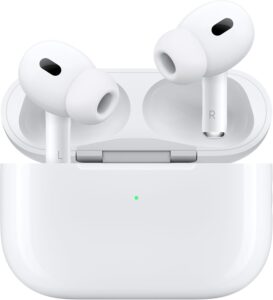
For sound, the AirPods 4 are simple to use, pair in just a few seconds, and have good microphones for video calls. AirPods Pro 2 are already very effective and add excellent noise cancellation. You’ll be able to work more comfortably in an open space, a café, or on the train. Since they’re part of the Apple ecosystem, they’re also smoother and easier to use day to day.
Depending on your budget
Because we do have to think about it, budget is always an important factor.
For smaller budgets, I recommend choosing the iPad with A16. It is the entry-level model, but it still covers the essentials: web browsing, video, note-taking, and everyday apps. You’ll just need to add the Apple Pencil USB-C to annotate PDFs and make simple drawings. With this iPad and this Apple Pencil, you should stay under the €600 mark.
For a smart, balanced budget, you can choose the iPad Air (M4) – 11 inches. You’ll get more power, a better display, and compatibility with the Apple Pencil Pro. This time, expect to be closer to the €800–900 range depending on the configuration and accessories.
If you have a very comfortable budget, you can treat yourself to the latest iPad Pro. With this model and its accessories, the price climbs quickly and easily goes beyond €1,000. But if you plan to keep it for a long time and use it for work, it may be worth it.
To find good deals and pay less, you can always look at refurbished options or education offers. If you already have an iPad, you can resell it to buy a newer one. In general, resale prices are attractive. And even if more storage increases the budget, you still need to choose it carefully. In my opinion, it’s better to aim a little higher from the beginning than to feel stuck—or at least limited—later on.
Depending on the accessories
To finish, I recommend taking a close look at the accessories that go with your iPad:
Stylus
As I was saying, if you take notes or draw, the Apple Pencil really makes a difference. Recent models are compatible with Apple Pencil (USB-C), Apple Pencil Pro, and, in some cases, Apple Pencil (1st generation). For older iPads, it is important to check exactly which stylus is compatible.
Keyboard
For regular typing, the Magic Keyboard or Magic Keyboard Folio, depending on the model, is a real plus: integrated trackpad, stable angles, and comfortable typing. Folio keyboards are also more affordable and still comfortable.
Protection
We think about it for our phones, but not always for iPads. Yet a good case and a tempered glass screen protector can help avoid scares and micro-scratches. If it’s a family iPad, I even recommend choosing a reinforced case. If you use an Apple Pencil, choose a case that allows the stylus to attach and charge properly. One last little tip for protection: if you watch videos, a case with an integrated stand is more practical.
Charger and cable
Depending on the model and the retailer, the charger may not always be included with your iPad. If that’s the case, get a USB-C charger of at least 20 W, or even 30 W for larger models. At least you’ll be properly equipped.
I’ll stop here for this guide to the best iPads of the moment. I hope this article helps you choose your future iPad. By the way, I’ll make sure to update it as new models are released.
To stay in the same spirit, I invite you to take a look at our guide to the best instant cameras.
See you soon for more photo accessory guides.

Written by Sylvain PONS
I've been passionate about photography since 2010, learning as I went along. Today, I dedicate myself to guiding others in their choice of camera gear and sharing a variety of tips to improve their photography skills.
Despite our care, a mistake may have slipped into this article. If you find any, please don't hesitate to let us know so we can correct it as soon as possible and keep our information up-to-date!