Panasonic G90 full review
Last update: 06/17/2026
Our blog continues to grow thanks to you, our readers. This post may contain affiliate links, which means we can earn a small commission if you make a purchase through them, at no extra cost to you. This helps us to continue to bring you more and support our work!
Micro 4/3 cameras are often criticized, but they still have plenty going for them. Panasonic and Olympus created this mount in the early 2010s as a practical way to share their lens ecosystems and offer an alternative to APS-C mirrorless cameras, which were developing new technologies but were still expensive and not always as capable. Ten years later, Panasonic had built several camera lines and generations, along with a fairly extensive lens lineup, ranging from entry-level to high-end options. In fact, we have a page listing all the Micro 4/3 lenses available for both Panasonic and Olympus cameras.
The Panasonic G90 follows in the footsteps of the other cameras in the range and was described by Panasonic as a “versatile adventurer.” Why that description? Because it has the build quality of a higher-end model and is capable of delivering strong performance in both photography and video. Although the G9 sits above it in the range, the G90 offers much of what its predecessor did, but in a lighter, more compact body. However, it also offers more than more amateur-oriented cameras such as the GX9, or Olympus models in the same format, like the E-M5 III.
The Panasonic G90 was announced in April 2019 and became available in June 2019, which is a long time for a modern camera body to go without a major update. Even so, it still feels fairly relevant today. Most of its shortcomings can still be found on many newer cameras, and the points Panasonic has often been criticized for, especially autofocus, did not change much until the brand’s more recent models. Available for around €1,000 at launch, its price has not dropped dramatically given the lack of a direct renewal for several years and a market that has remained in a similar price bracket. It can now often be found for less, depending on availability and kit configuration. Higher-priced bundles include a kit lens, but these do not really do justice to the format. You can get much better images with good lenses, such as Panasonic’s 12-60mm f/2.8-4 (in partnership with Leica).

Key features of the Panasonic G90
| Details | Visual |
|---|---|
|

|
Ergonomics and handling
As a camera designed for adventurous use, the G90 clearly received extra attention from Panasonic in terms of build quality. This is a genuinely rugged camera. It is sealed to withstand difficult weather conditions. If you are looking for a larger used camera in this price range (such as a Fujifilm X-T3 or Nikon D750), Olympus also offers the very well-built E-M5 III for a little more.
The camera’s ergonomics are very good, with plenty of controls and buttons. On the left shoulder, for example, there is a switch for moving from single-shot to burst mode or the self-timer, which is handy when you need to choose a drive mode quickly. On the right shoulder, you get the usual shooting mode dial, the famous PASM, plus Scene, Movie and C1/C2 modes. These can be customized through the menu. Around the shutter release is the front dial, which on other brands is usually placed at the top of the grip (i.e. below the shutter release). This is useful because it reduces the finger movement needed to switch from one dial to the other, although it also increases the risk of turning the dial by accident while shooting. You need to be a little flexible with your finger position to avoid this, but it quickly becomes a habit.
The rear dial sits where you often find exposure compensation on other cameras. There is a button to lock it and prevent you from accidentally turning it with your thumb while using the thumb rest. There are 3 buttons, differentiated by how much they protrude, with the middle one even featuring 2 small dots to make it easier to identify in the dark. Used with the rear dial, they let you change white balance, ISO sensitivity or exposure compensation. The traditional video recording button sits just below. All these buttons can be configured and assigned to other functions.
At the top of the back is the AF mode selector, along with the exposure and focus lock buttons. This can be set to AF-ON, a function experienced photographers will know well, whether they use it or not. On the right, you move the AF points the old-fashioned way — no joystick like on the G9 — using the control wheel around the menu button. Above this wheel is the Play button for viewing images, while below it are the Fn2 button, which displays shortcut functions while shooting, and the Disp. button, which changes the information shown on screen. On the left, Panasonic has not left the area empty either, adding the Fn3 button, which can also be customized. To put it simply, Panasonic has only left space where your hand or fingers need to rest and filled almost everything else with controls.
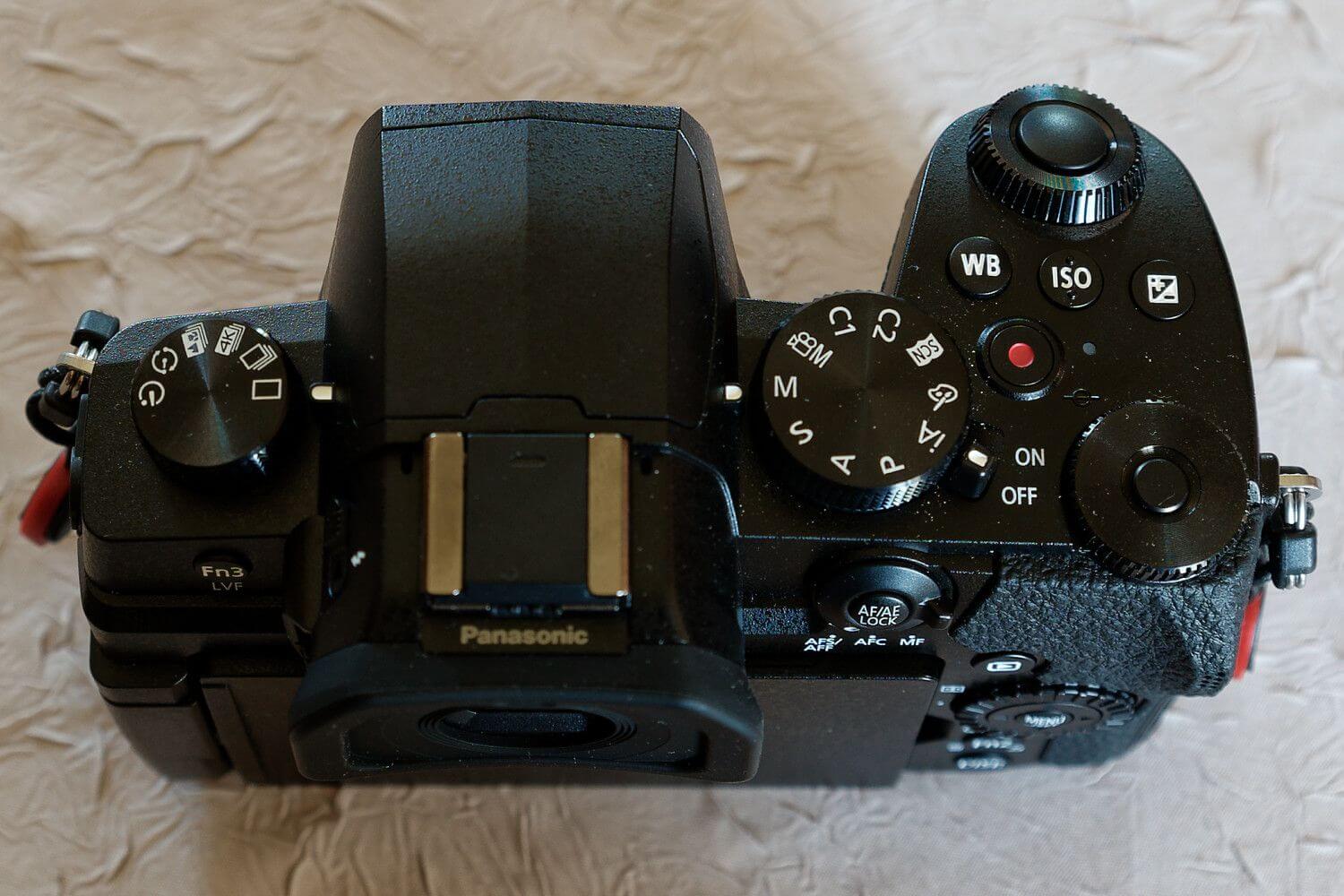

The grip is very well designed, with a deep, nicely shaped handle that gives you a secure hold. Having used both the GX9 and the G9, I found the G90 the most natural to hold. The GX9 felt much simpler in the sense that it kept things compact with a very small, flat grip, while the G9 felt too imposing, especially for a camera in this format. The G90 also has dimensions that make it easy to hold without turning it into a brick. The GX9 was almost too compact, with the little finger wandering under the grip. The G9 is much bulkier, even more so than some full-frame cameras. Although a few grams less would have been welcome, as on the E-M5 III, the G90 is well balanced and sits comfortably between its two siblings.
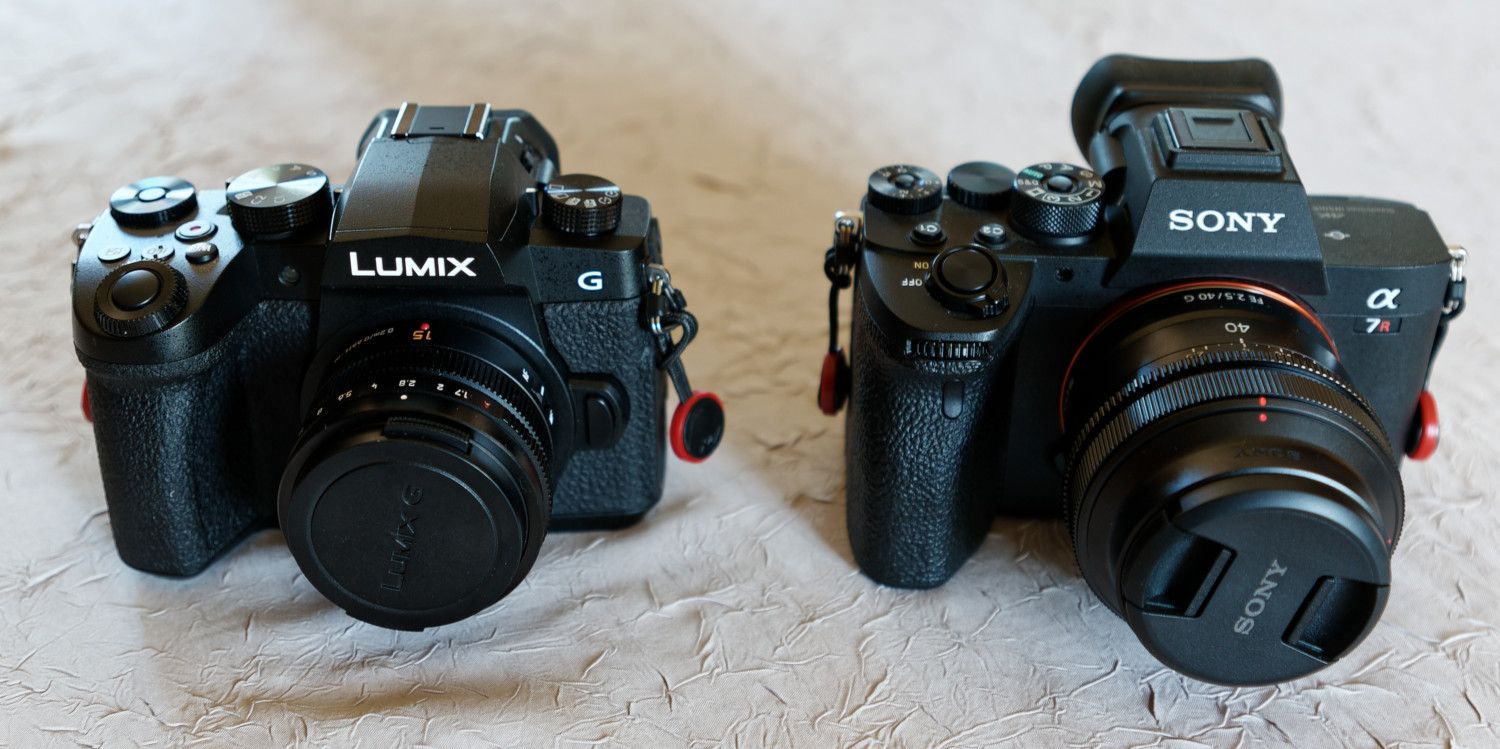
The G90 with a 15 mm f/1.7 is not much more compact or lighter than an A7R IV with a 40 mm f/2.5.
Both the rear screen and the viewfinder use OLED technology, which means high contrast, good color quality and wide viewing angles. This is especially worth pointing out for the rear screen. Most manufacturers have stuck with LCD technology for this part of the camera, and LCD screens can struggle when exposed to bright light. The screen is touch-sensitive, of course, and Panasonic is one of the least restrictive manufacturers when it comes to touch control, offering a smooth, responsive interface that can control almost everything displayed on screen.
Since this is a camera designed for both photography and video, Panasonic could hardly avoid using a fully articulating screen. It can be turned in almost any direction, including toward the camera body to protect it, or simply to stop yourself from looking at it while shooting, for example. The electronic viewfinder is not the best available today, but it offers comfortable magnification, somewhere between the GX9 and the original G9, along with good image quality.

Camera performance
Autofocus
Autofocus performance is very good in AF-S. In fact, Panasonic’s contrast-detection system is probably one of the best when it comes to focus acquisition speed. It will not let you down for landscapes or architecture, for example, especially since Micro 4/3 lenses have been able to keep up with the AF modules in the camera bodies from the start. You also get maximum AF coverage across almost the entire frame.
AF-C performance is more nuanced. It is not that the system is slow, but contrast detection requires constant calculations, which creates a pumping effect. Even when the camera focuses on the right spot, this can be very distracting when taking photos, and even more so when shooting video, because the pumping is visible in the footage. Other brands also use this type of detection, but they combine it with phase detection, which is less precise but faster and, above all, does not pump. Together, the two systems make autofocus faster, more sensitive and more accurate. Yes, more sensitive too, because low-light scenes naturally have less contrast and are therefore harder for contrast detection to read.
With mirrorless cameras, manual focusing is made easier by the many aids available. The combination of focus peaking and magnification makes it fairly easy to see exactly where the camera is focusing. Focus peaking highlights the sharp areas, and you can customize the highlight color. The camera also displays a distance bar, but it is not graduated, so setting your lens to hyperfocal distance, for example, remains tricky. You can also toggle the magnifier and change the zoom level.
AF customization
The camera offers a wide range of settings to help the autofocus system focus on the right subject. These include
- A face and eye detection mode for portraits; by moving the area with the function wheel, you can switch to 1-zone mode, for example, to specify which face matters most,
- A tracking mode, useful only in AF-C, which refocuses on the selected area (note that it does not track the subject itself, but whatever is inside the area),
- A 49-zone mode that lets you reduce the number of areas in which the camera has to find the subject to a 3×3 group from the 49 available zones,
- A custom mode that lets you reduce the focus area to a cross-shaped zone whose size can be adjusted,
- A 1-zone mode, which reduces the scene to a single focus area whose size can also be changed,
- Precise Point mode, available only with AF-S, which lets you aim at a specific point while also displaying a magnified view for even greater precision.
Burst rate
The G90’s burst rate is not among the best on the market, but it is enough for most photographers. It is a shame, however, that burst shooting is faster in AF-S than in AF-C; the opposite would have been more useful, because when you want to follow a subject, you often need a longer burst to better analyze its movement. You can therefore expect 9 frames per second in AF-S and 6 fps in AF-F/AF-C. (In AF-F, the camera decides whether or not to follow the subject, so it is limited to the slower of the two modes). Buffer capacity — in other words, the number of shots you can take before the camera has to stop and write to the SD card — is also fairly limited when shooting in RAW. However, you can hold the shutter down for more than 7 seconds in RAW, which is enough in most situations, since 45 RAW frames let you follow a subject at 6 fps. With JPEG, you are more likely to stop shooting long before the buffer does. The shutter is also very sensitive, perhaps too sensitive. In medium and fast burst modes, it is almost impossible to take a single photo, even if you lift your finger quickly, because you will often end up with 2 or even 3 images in a row.
Face recognition
At a time when manufacturers are competing to offer more and more scene recognition modes, the G90 is still limited to human faces and eyes. This means there is no animal or vehicle detection. You will find those features on the latest cameras from Sony, Nikon, Canon and even Olympus. The G90’s human face and eye detection is fairly effective, although you will need to use AF-C to track a face. The experience is spoiled by the pumping and limited sensitivity of contrast detection, which is a minor annoyance in stills but a real handicap in video.

The Eye AF even detected the eyes of this statue.
Noise
The mechanical shutter is very discreet. This is easier to achieve with a small sensor such as Micro 4/3 because the shutter has a shorter distance to travel. As with all mirrorless cameras, however, you can switch to an electronic shutter. In this case, the shutter is completely silent. This shutter does have a few drawbacks, though, including rolling shutter and banding. Banding is the appearance of regular dark bands across the image when shooting under artificial light. It is more visible at certain shutter speeds. Rolling shutter is image distortion that appears when there is movement during shooting or in video. It can be quite visible when following a moving subject or filming in 4K30p. For moving subjects or fast panning, it is better to shoot at a lower resolution and use the mechanical shutter. The camera also has an automatic setting, leaving the body to choose between shutter types depending on the scene.


The table is distorted when the image is captured while the subject is still moving.
Stabilization
The sensor’s stabilization is very effective, making it easy to gain 3 or even 4 stops handheld. This means that with a lens such as Panasonic’s 15mm f/1.7 (full review), where you would normally use a safe shutter speed of around 1/30th of a second to avoid motion blur, you can extend the exposure to 1/4 or even 1/2 second thanks to stabilization. If you use a lens that is also stabilized, Dual I.S. — meaning a combination of the two stabilization systems — can give you another 1 or 2 stops. For example, if the 15mm lens were stabilized, you could shoot handheld at around one second without too much risk of camera shake. Of course, effective stabilization does not mean you can skip the basics: you still need to hold the camera properly and avoid shaking, haha.

At 1/60th with the Olympus 75mm, the image is perfectly sharp handheld; without stabilization, it would be closer to 1/200th. 1/30th or even 1/15th could have been considered.
Startup, photos and navigation
The camera is not the most responsive by recent standards, but it is fast enough to start shooting quickly. It takes about one second to power on. Even in single-shot mode, you can take several photos very quickly, so you do not have to wait long before pressing the shutter button again. Menu navigation is simple and intuitive, and the touchscreen lets you browse through settings almost like you would on a smartphone.
Image quality
The G90 has a 20MP Micro 4/3 sensor with no low-pass filter, which helps extract maximum detail from the lens. However, while some might consider it the same sensor as the G9, the results are not identical. Having already compared the G9 with the GX9, which also has a 20MP Micro 4/3 sensor, I found that the images looked similar up to a certain ISO sensitivity, but that the G9 started to pull ahead at higher values. The G90 seems to behave more like the GX9 and is therefore slightly below the G9.
In terms of noise and loss of detail as ISO increases, the sensor handles the transition from ISO 100 to ISO 400 very well, with an initial plateau at ISO 800. At ISO 1600, however, noise becomes harder to manage, and even more so at ISO 3200, where the loss of detail becomes more noticeable. ISO 6400 is a critical threshold, where color and fine detail are largely lost. ISO 12800 and 25600 are practically unusable if you want to maintain good photo quality, with contrast dropping sharply, very high grain and overly smoothed contours. At these values, the G9 still seems to hold up better, especially in terms of contrast, and it is likely that the processor and components of its bigger brother handle signal amplification more effectively.


Dynamic range is quite good at low ISOs, although obviously not at the level of larger sensors. It gradually decreases as sensitivity increases. The newer Micro 4/3 sensors found in the GH6 and OM-1 Mark II perform better, but they are not from the same generation and do not cost the same. In high dynamic range situations, it is better to combine several exposures for HDR, which requires a careful method. Otherwise, you need to expose correctly, even if that means accepting shadows that are easier to hide. Larger sensors still have limits here too. They simply require fewer images for HDR processing, or are less likely to block up the shadows when exposing to the right.
I would therefore advise you to stay below ISO 1600 with the camera’s noise reduction algorithms and most software if you want to get the most out of the 20MP sensor. You can still go up to ISO 3200 for standard uses such as 4K screens or A4 prints, provided you do not crop too heavily beforehand. If you use good denoising software, such as DxO DeepPRIME or Topaz DeNoise processing, you can expect better results. You can push the ISO up to 6400 while maintaining more than decent quality. It is true that these values may seem low for APS-C, and even more so for the latest full-frame cameras. But there are two things to keep in mind:
- The values quoted here are based on my own standards, and it is possible that you will be happy with the results at ISO 12800, even when shooting at 20MP. But I assume that if you are looking for a dedicated interchangeable-lens camera, you want more than what you would get from a smartphone or a compact camera costing under €500,
- The results at ISO 3200, or even ISO 6400, are better than what you would get at the same values with more basic cameras such as the Sony RX100 or a smartphone, as long as you learn to use your camera properly and do not rely only on automatic settings.
For video, the camera offers 4K30p with up to around 90 minutes of recording on battery power and no limit with an external power supply. However, image quality falls short of the GH5/6 and G9, as there is a 1.26x crop. Panasonic had to justify the price of its higher-end cameras! That said, the G90 does offer access to cinema profiles and V-Log L for color grading in post-production. The latest video-oriented cameras offer 4:2:2 10-bit sampling. The G90 does not, making do with 4:2:0 8-bit internally and 4:2:2 8-bit via HDMI output… if that sounds like another language to you, then the G90 will be more than enough for your videos, haha. In Full HD, the camera has a 120fps slow-motion mode, which is the minimum expected for a camera at this resolution.

Exposed correctly for the highlights (exposure to the right), the shadows are difficult to recover, but you still get a nice dynamic range.
Conclusion
That brings us to the end of our Panasonic G90 review. To sum up, it is a well-designed camera that performs very well for its price. It is a versatile adventurer that does its job very well. For a few dozen euros more, however, you might wonder whether the Olympus OM-D E-M5 III is not more interesting in some respects, as it is lighter and more compact and, among other things, has a phase-detection AF system that avoids pumping. In another format, the Fujifilm X-T30 II and X-S10 are also available at nearly the same price, the former with a design similar to the Olympus E-M5 III and the latter with ergonomics closer to the Panasonic, but with a larger APS-C sensor and a good lens lineup. However, they have other limitations, such as the lack of a weather-sealed body or, in the case of the X-T30 II, the lack of sensor stabilization. Among other brands, the newer Nikon Z50 II and Canon R10 have their own limitations, and their native lens ranges are still limited.
Panasonic has since released the G97, but it remains more of a refresh than a true generational leap, and it still does not bring the phase-detection autofocus we were hoping for to put an end to AF pumping. In the meantime, the G90 can still deliver quality images in a pleasant body, with enough power for most uses. If you want to go further, I invite you to read the review of the Panasonic 42.5mm f/1.7 OIS.
As I keep saying, if you enjoyed this review, you can support our work on the blog by buying your camera through: B&H / Amazon. Of course, it will not cost you any more, and it helps us continue producing free content.
We hope to see you soon,
For your information, here are the links to the other cameras mentioned in the article

Written by Sylvain PONS
I've been passionate about photography since 2010, learning as I went along. Today, I dedicate myself to guiding others in their choice of camera gear and sharing a variety of tips to improve their photography skills.
Despite our care, a mistake may have slipped into this article. If you find any, please don't hesitate to let us know so we can correct it as soon as possible and keep our information up-to-date!